Time tracking your team won’t have to chase.
A timer on every issue, a week that fills itself in, leave and holidays handled, approvals in one click — and reports that go all the way to the invoice.
Logging time is free on every plan · timesheets and reports on paid plans · billing and profitability with the PSA add-on
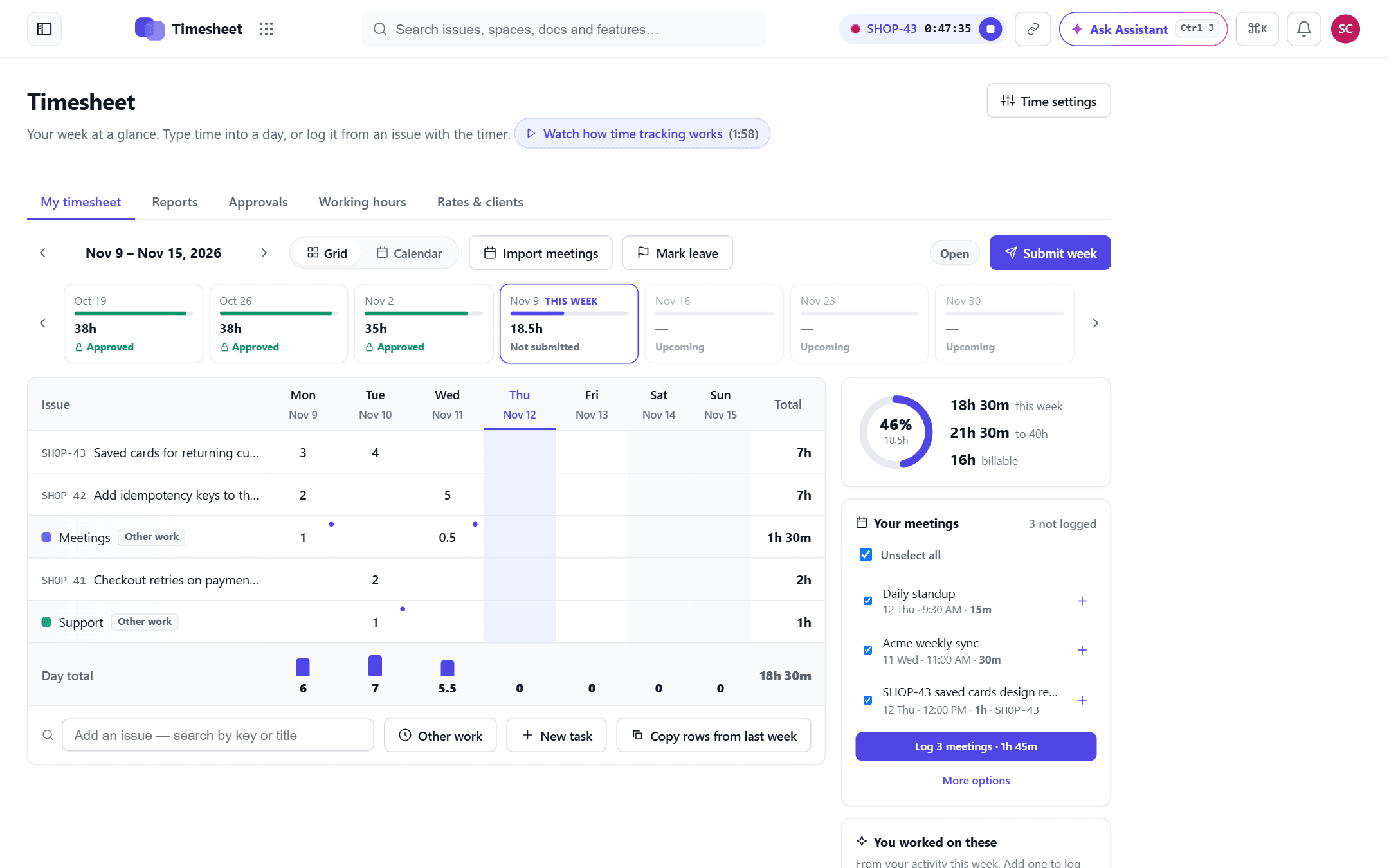
Start a timer on the work itself
- Press T on an issue to start; press it again to stop and log
- Or log in one click: +15m, +30m, +1h, +2h — with Undo
- Type time the way you say it: 45m, 1h30, 1.5 or 2d 4h
- Remaining estimate updates as you log, so estimates stay honest
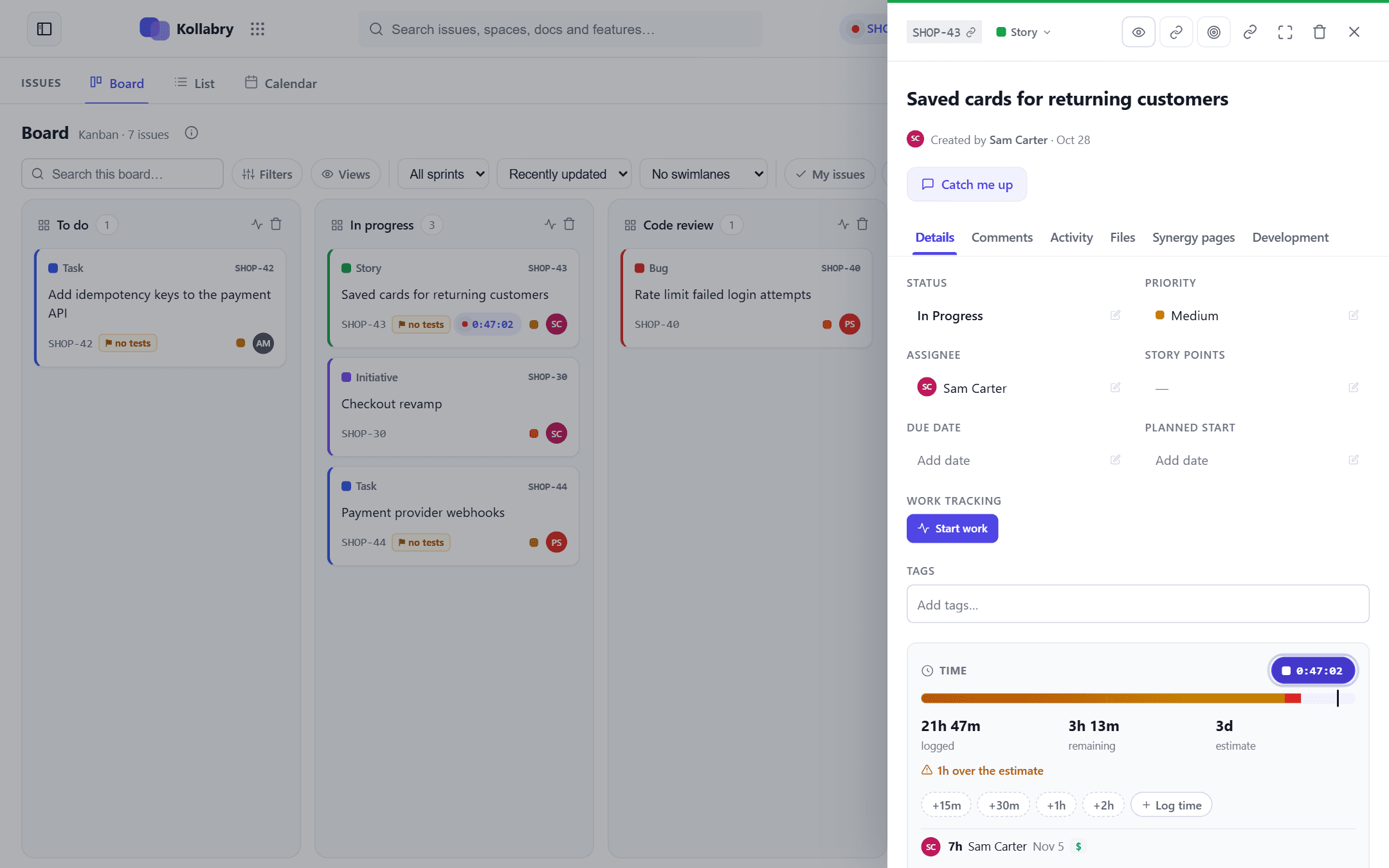
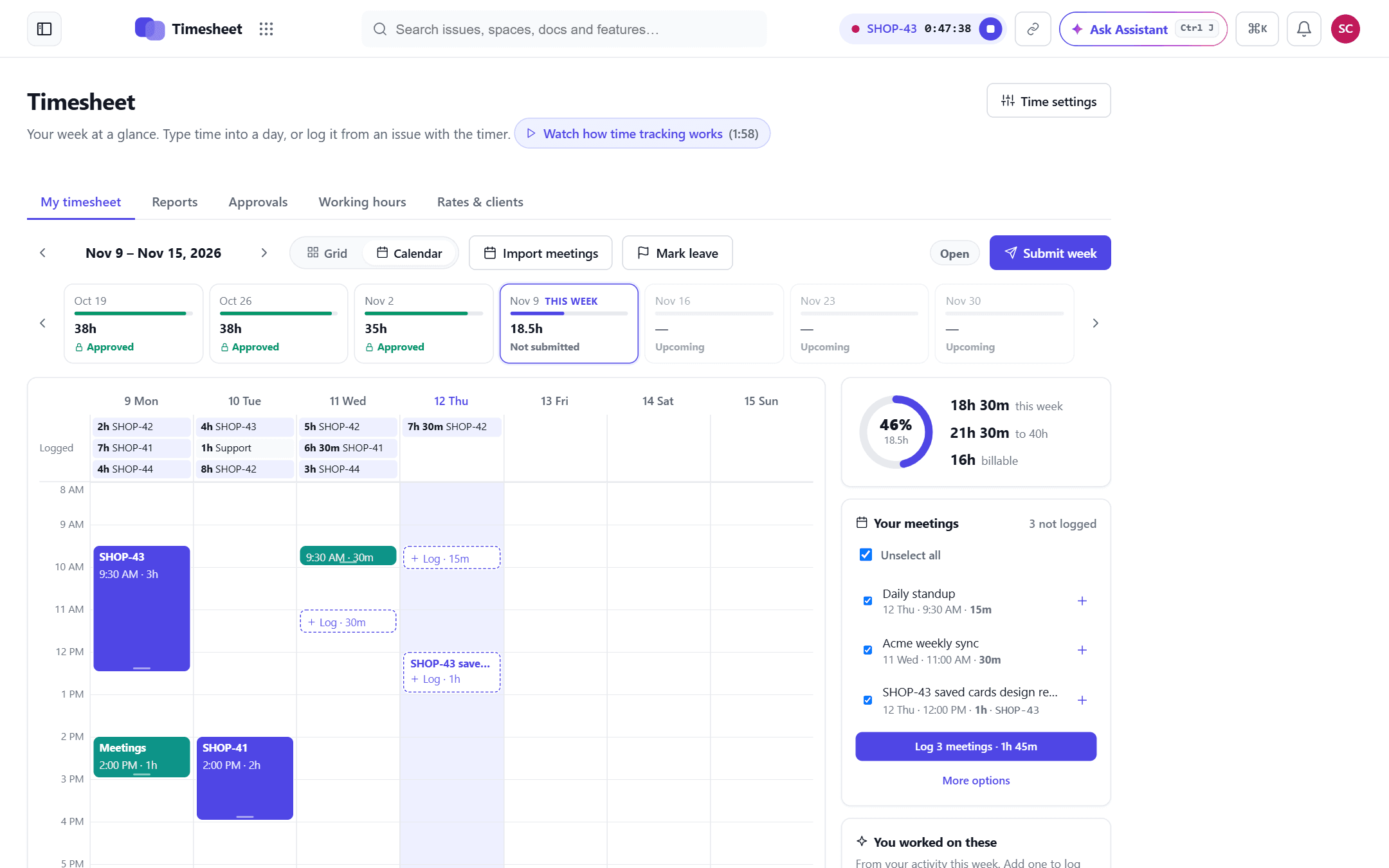
Your whole week on one screen
- One row per issue, one cell per day: type a total and press Enter
- “You worked on these” suggests the issues you touched this week
- Meetings from Outlook or Google Calendar, logged only when you pick them
- Other work — meetings, support, admin — sits beside the issues
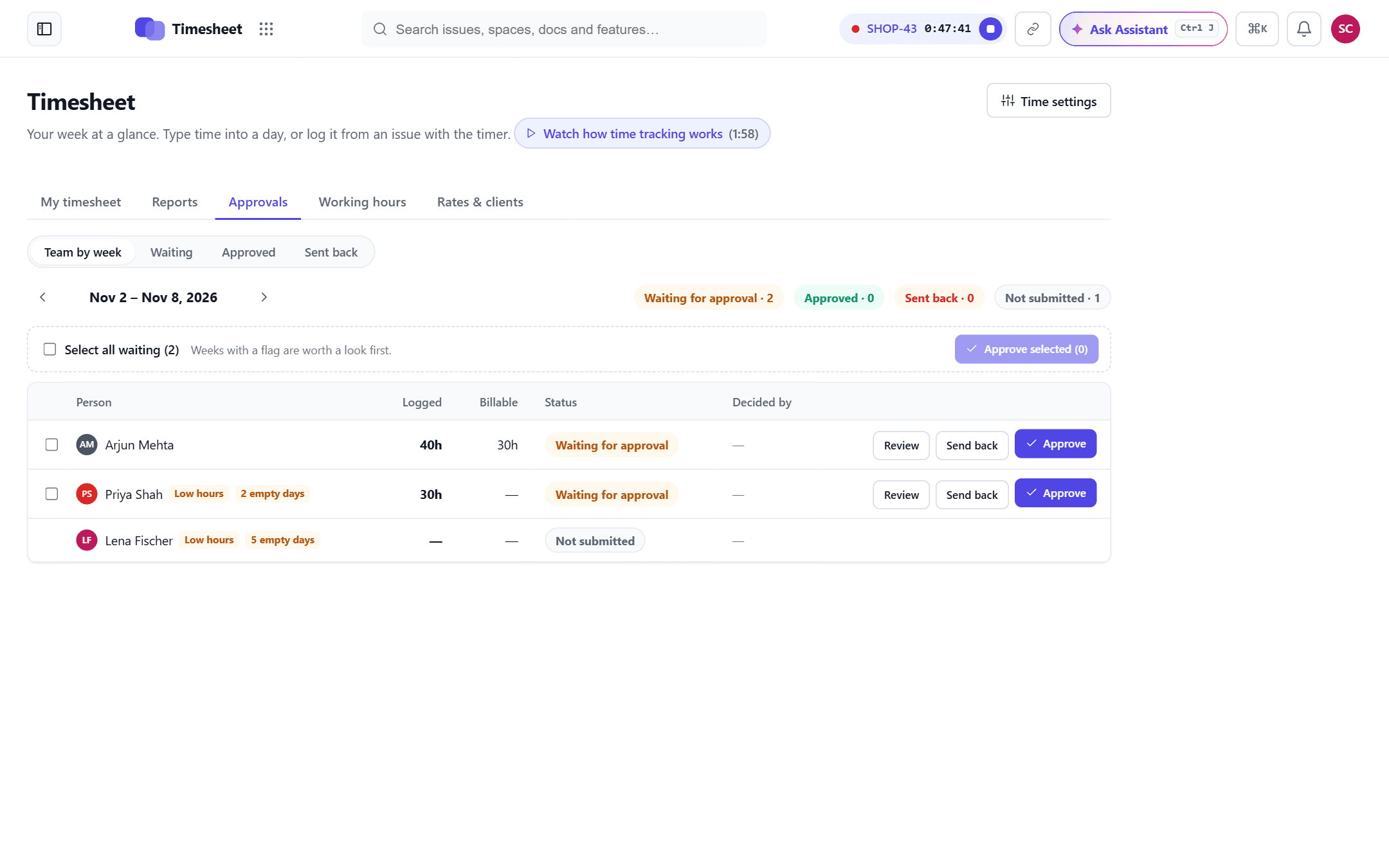
Submit on Friday, approved by Monday
- People submit their week in one click
- Space leads approve their team’s time; admins cover the rest
- Low hours and empty days are flagged before anyone approves
- Approved weeks lock; a week sent back comes with a reason
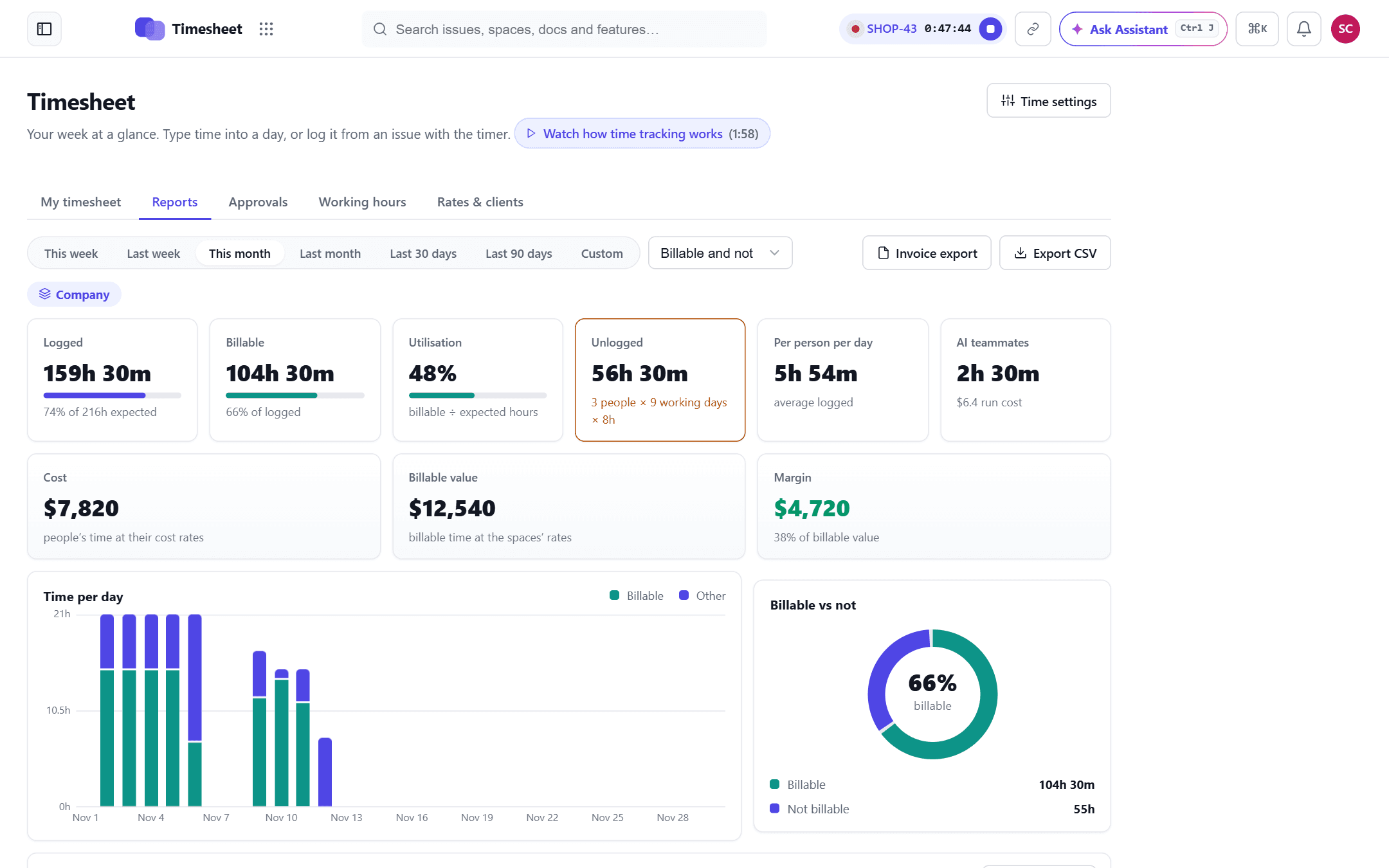
From hours to invoices
- Logged against expected, billable share and utilisation
- Cost, billable value and margin from people’s and spaces’ rates
- Drill from company to client, space, issue and person
- Export CSV, or issue numbered, branded invoices with tax
A week on leave isn’t a short week
Leave lowers what’s expected: the week target, missing-time reminders, approval flags and utilisation all leave it out — and approvers see it right next to the hours.
Booked ahead, up to a year out — one day or a range, whole or half days.
Marked for today or a day that passed, with an optional note.
Admins set the workspace’s holidays and days off; they’re skipped for everyone.
Hours per day and working days per person, so a four-day week is a full week.
See the day the way you lived it
- Logged time and meetings as blocks on a calendar
- Drag to create, move or resize a block
- Meetings not yet logged appear as dashed blocks — one click to log
Hours you can actually trust
No forgotten timers
The timer follows you on every page and in the browser tab. Left it running overnight? Kollabry asks what to keep before anything is logged.
Only the assignee logs time
Time goes on issues assigned to you — in the app, the timesheet, the API and AI assistants. Approved weeks are locked; invoiced time is never billed twice.
Time where the work is
Hours sit on the issue, next to the estimate, the sprint and the release. No second tool to keep in sync, no copying between systems.
AI teammates, kept separate
Time an AI teammate spends on an issue is logged as theirs, with its run cost — never counted in people’s hours or against the estimate.
Rates, clients and margin
Cost rates per person, billing rates per space and client, in any currency. Each entry is priced at its own day’s rate.
Invoices without a spreadsheet
Numbered, branded invoices with GST or VAT, as PDF. Issued time is stamped and locked; voiding an invoice releases it.
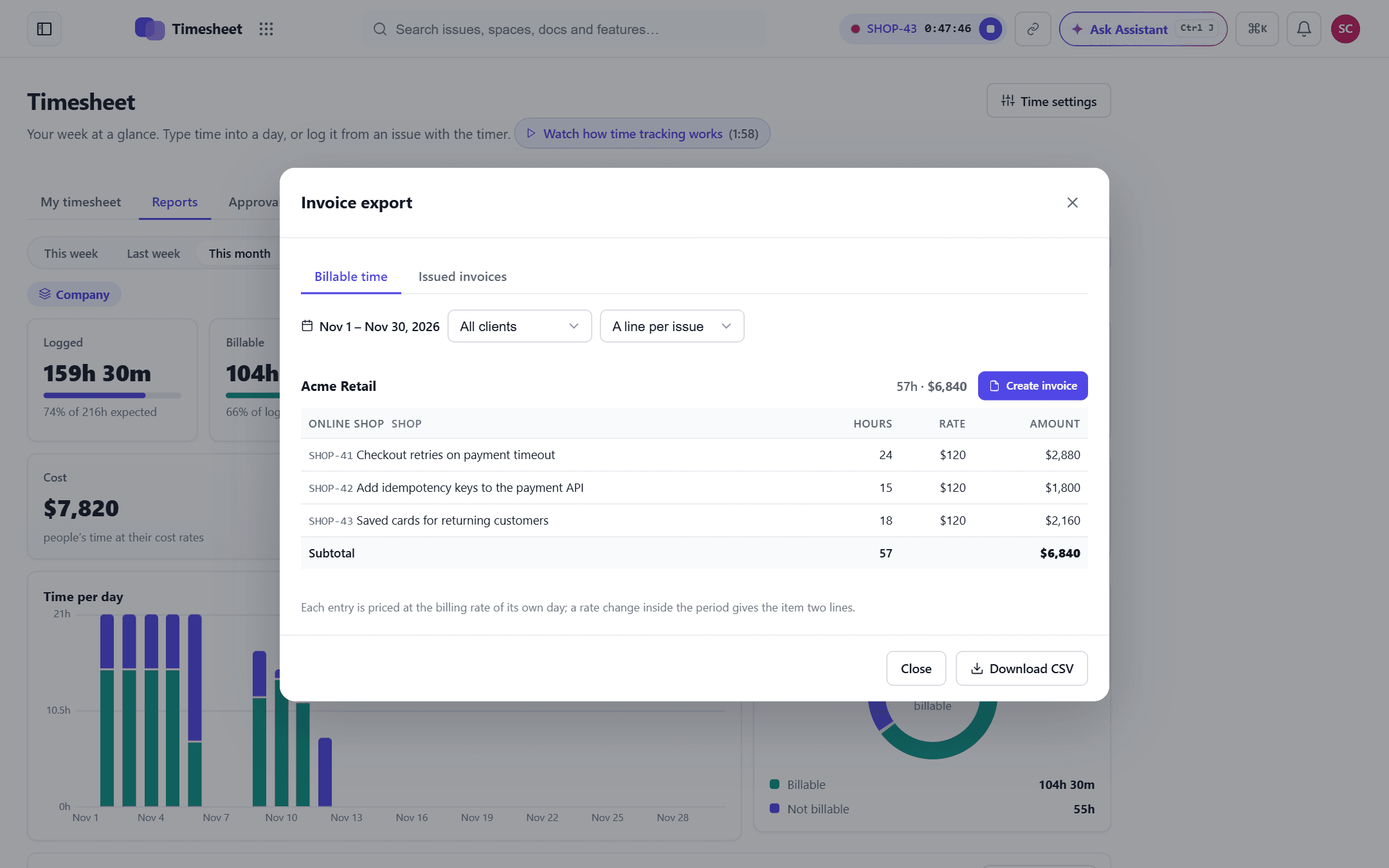
Billable time, priced and ready to send
- Grouped by client and space, a line per issue or per person
- Each entry priced at its own day’s rate
- Issue a numbered invoice with tax, or download the CSV
Time tracking, start to finish
Recorded in the real product: the timer, the weekly timesheet, meetings, approvals and reports.
- Start and stop a timer from the issue or the board
- Fill in the week, add meetings and other work
- Submit, approve and lock the week
- Report, drill down and export an invoice
Plays from YouTube (privacy-enhanced mode). Nothing loads until you press play.
Why track time next to the work
Questions teams ask
Is time tracking free?
Yes. The timer and logging time on issues are free on every plan, including Free for teams of up to 5. Timesheets, approvals and reports are on paid plans.
Who can log time on an issue?
Only the person the issue is assigned to — everywhere: the Time section, the timer, the timesheet, calendar blocks, the API and AI assistants. If an issue is reassigned, you can still lower or remove your own time on it.
Who approves timesheets?
When an admin turns on weekly approvals, people submit their week. The leads of the spaces where the time was logged approve it, with admins covering time where no lead is involved. Nobody approves their own week.
How are leave and public holidays handled?
People mark their own planned, unplanned or sick leave on their timesheet; admins set public holidays. Leave lowers the week’s target, reminders, approval flags and utilisation, and shows to approvers and in the People report. A week fully on leave can be submitted with no time.
Can we import meetings from our calendar?
Yes. Connect Outlook or Google Calendar and Import meetings shows the week’s meetings. Only the ones you pick are logged, as Meetings or against an issue.
Can we bill clients from it?
Yes, with the PSA add-on. Set billing rates per space and client, mark time billable, and the invoice export prices each entry at its own day’s rate. Admins issue numbered, branded invoices with taxes, downloadable as PDF. See kollabry.com/psa.
What if someone forgets to stop the timer?
Kollabry asks as soon as they’re back: leave out the time away, log it all, keep it running, or discard it. A timer longer than 10 hours asks too, and one entry is at most 24 hours — both limits are adjustable.
Is there an API?
Yes: /api/v1/issues/:key/worklogs and /api/v1/time/report, and AI assistants can log and read time (log_time, get_time, time_report, and for admins time_profitability) through Kollabry’s MCP server — e.g. “Which client is least profitable this quarter?”.
Know where the week went
Free for teams of up to 5. Time tracking, the tracker, docs, QA and AI in one workspace.