Issues and epics
Stories, tasks, bugs and epics with their status, priority, assignee, labels and due dates. Epics become initiatives, so your hierarchy stays intact.
Bring your Jira issues, epics, sprints and custom fields, and your Confluence pages, into one workspace. Kollabry recognises your Jira export, maps the columns for you and shows a dry run before anything is created.
Your backlog, your plan and your documentation, so the team picks up where it left off.
Stories, tasks, bugs and epics with their status, priority, assignee, labels and due dates. Epics become initiatives, so your hierarchy stays intact.
Sprint names from your export become Kollabry sprints, and story points carry over as estimates, so velocity has history from the start.
Requirements, specs and runbooks become Synergy documents with their page tree, ready to link to the work and trace to tests.
About 30 minutes for a typical project. You can repeat it for each team or project.
In Jira, open the issue search (Filters), search for the project or issues you want to move, and choose Export → CSV (all fields). An Excel export works too.
Create a space for the team (or open an existing one). It comes with a board, backlog and sprints ready to use.
Open the space’s Backlog, choose Import and pick your CSV or Excel file. Kollabry recognises the Jira export automatically.
Summary, type, status, priority, assignee, epic, sprint, story points, labels and due date are pre-mapped. Map each custom field to an existing field or create it; the type is guessed from your data.
See exactly what will be created, which values don’t fit and how many issues are ready, before anything changes.
Issues are created in the space, with epics as initiatives, sprints created by name and labels added. Large projects can be imported in batches of up to 2,000 issues.
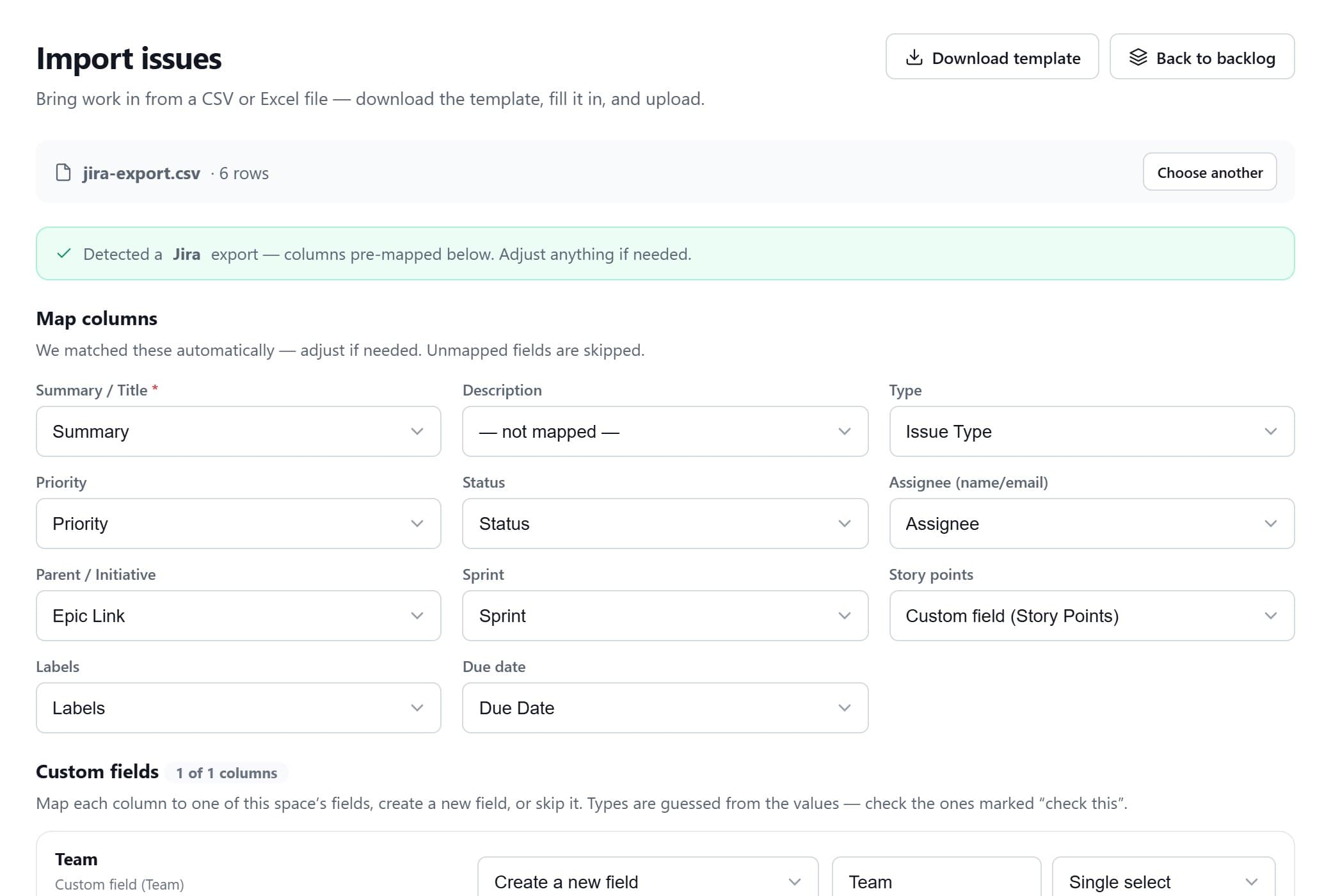
Pre-mapped for a Jira export. You can change any of it before you import.
| Jira column | In Kollabry |
|---|---|
| Summary | Title |
| Description | Description |
| Issue Type | Type (story, task, bug, epic, sub-task) |
| Status | Status, matched to your board’s columns by name |
| Priority | Priority |
| Assignee | Assignee, matched to space members by name or email |
| Epic Link / Parent | Initiative (existing initiatives are reused) |
| Sprint | Sprint (created if it doesn’t exist yet) |
| Story Points | Estimate |
| Labels | Labels (created if new) |
| Due Date | Due date |
| Custom fields | Custom fields: map to an existing field or create a new one |
Comments, attachments, issue links, change history and worklogs aren’t part of a CSV import. Many teams keep Jira read-only for a few months as the historical record. Each import takes up to 2,000 issues; split larger projects into batches, for example by epic or year.
Synergy is Kollabry’s docs and knowledge base, included in every workspace and linked both ways to the work.
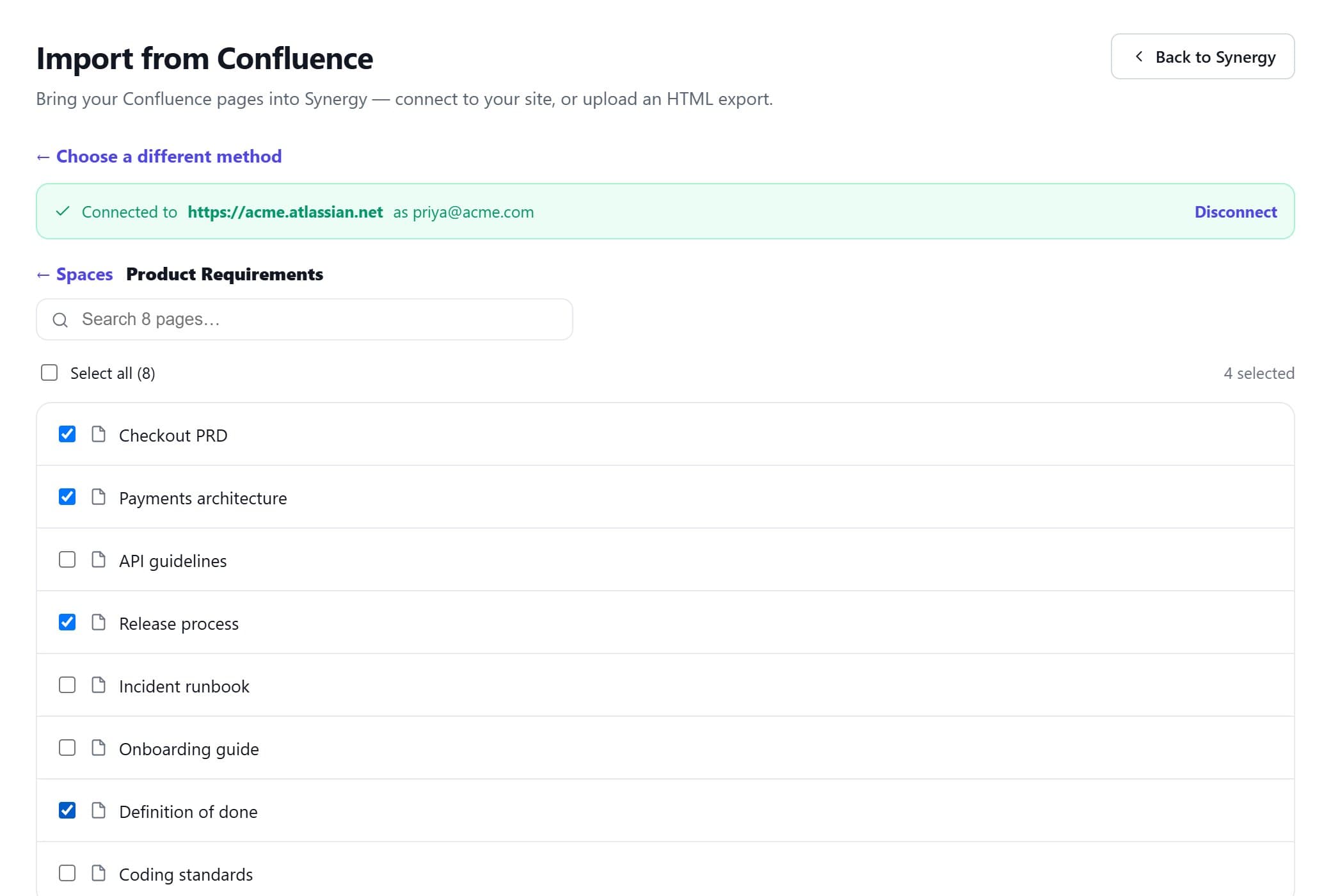
In your Kollabry space, open Synergy → Import from Confluence → Connect to Confluence, and enter your site URL, your Atlassian email and a classic API token (id.atlassian.com → Security → API tokens).
Browse your Confluence spaces, search pages, and tick exactly what you want to bring across.
Pages become Synergy documents, keeping the page tree (parent and child pages). Images are copied into Kollabry so pages still show them.
Export the space as HTML (Space settings → Export space → HTML), then upload the .zip on the same import page. No credentials needed.
No big-bang cut-over: move one team first, then the rest.
For one team, usually an afternoon: export a CSV from Jira, upload it to a Kollabry space, check the mapping and import. Confluence pages can be imported the same day. Most teams start with one team and move others once it’s working.
Yes. When you upload a Jira CSV or Excel export, Kollabry detects the Jira columns and pre-maps summary, type, status, priority, assignee, epic link, sprint, story points, labels and due date. Trello and Asana exports are recognised too; any other CSV can be mapped by hand.
Yes. Each custom field column can be mapped to one of the space’s fields or created as a new field, with the field type guessed from the values. A dry run shows any values that don’t fit before you import.
Comments, attachments, issue links, change history and worklogs are not part of the CSV import. Many teams keep Jira read-only for a while as the historical record.
Yes. Connect Confluence Cloud and pick spaces and pages, or, for Confluence Server and Data Center, upload the space’s HTML export (.zip). Pages become Synergy documents and keep their page tree.
Each import takes up to 2,000 issues. For larger projects, export and import in batches, for example by epic or by year.
No. You can run Kollabry alongside Jira with one team first. Kollabry connects to GitHub and your CI directly, so nothing in your pipeline changes.
No. Jira and Confluence are trademarks of Atlassian. This guide describes exporting from Jira Cloud and Confluence as we understand it; menu names can differ between versions.
Free for up to 5 users. Passwordless sign-up, then import from the Backlog in minutes.